


 Author: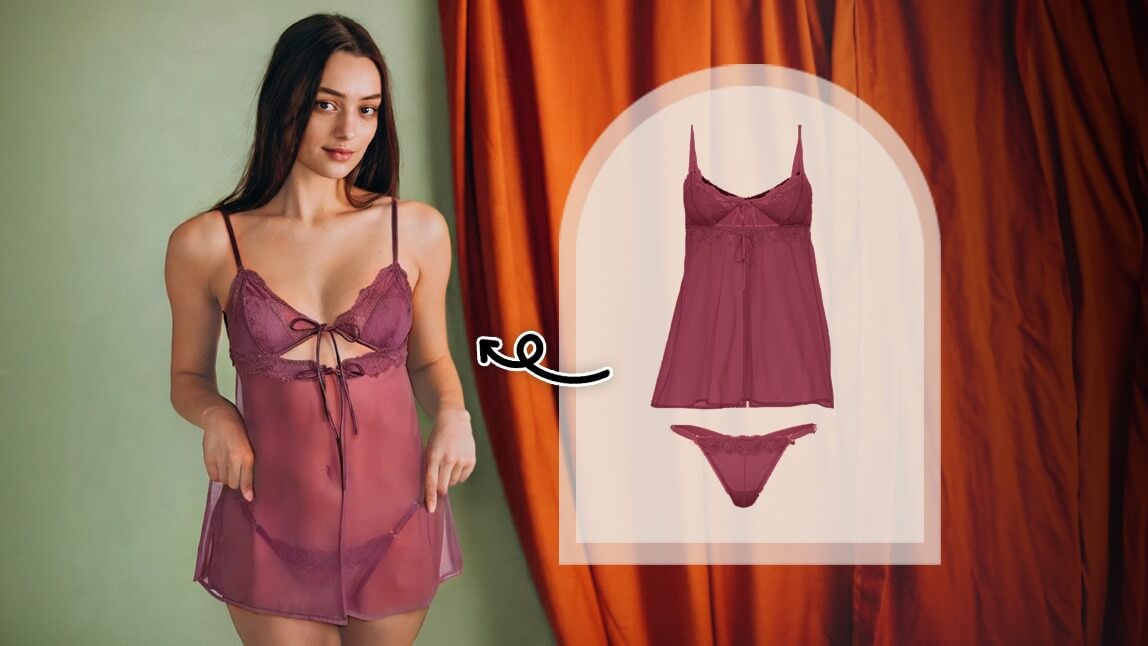
AI is transforming how we shop and lingerie is no exception. With AI lingerie try-on, you can now preview different lingerie styles on your own photo, instantly and privately.
Whether you're curious how a lacy bralette or satin set would look on you, virtual clothes try-on tools let you visualize the style before you commit, all without stepping into a fitting room.
Disclaimer: This article is intended solely for virtual try-on purposes. It does not promote, endorse, or support the creation or distribution of explicit content or deepfake imagery. Always use AI tools ethically and responsibly.
🧪 How I tested this: I updated this guide for 2026 after running the AI Clothes try-on in YouCam Makeup on several of my own photos. I used a full-body shot against a plain wall, a mirror selfie, and a photo in a busier room, then paired each with different lingerie reference images — lace bralettes, satin sets, and a corset-style top. Some combinations looked surprisingly natural, others clearly didn't, and the difference almost always came down to the photos I chose. Here's what I learned so you can skip the trial and error.
What Is AI Lingerie Try-On?
AI lingerie try-on is a virtual tool powered by artificial intelligence that lets users see how they would look in different lingerie styles. By uploading a photo, the tool overlays realistic lingerie designs on the body in a seamless, natural-looking way. It’s similar to how virtual outfit try-ons work but tailored to undergarments.
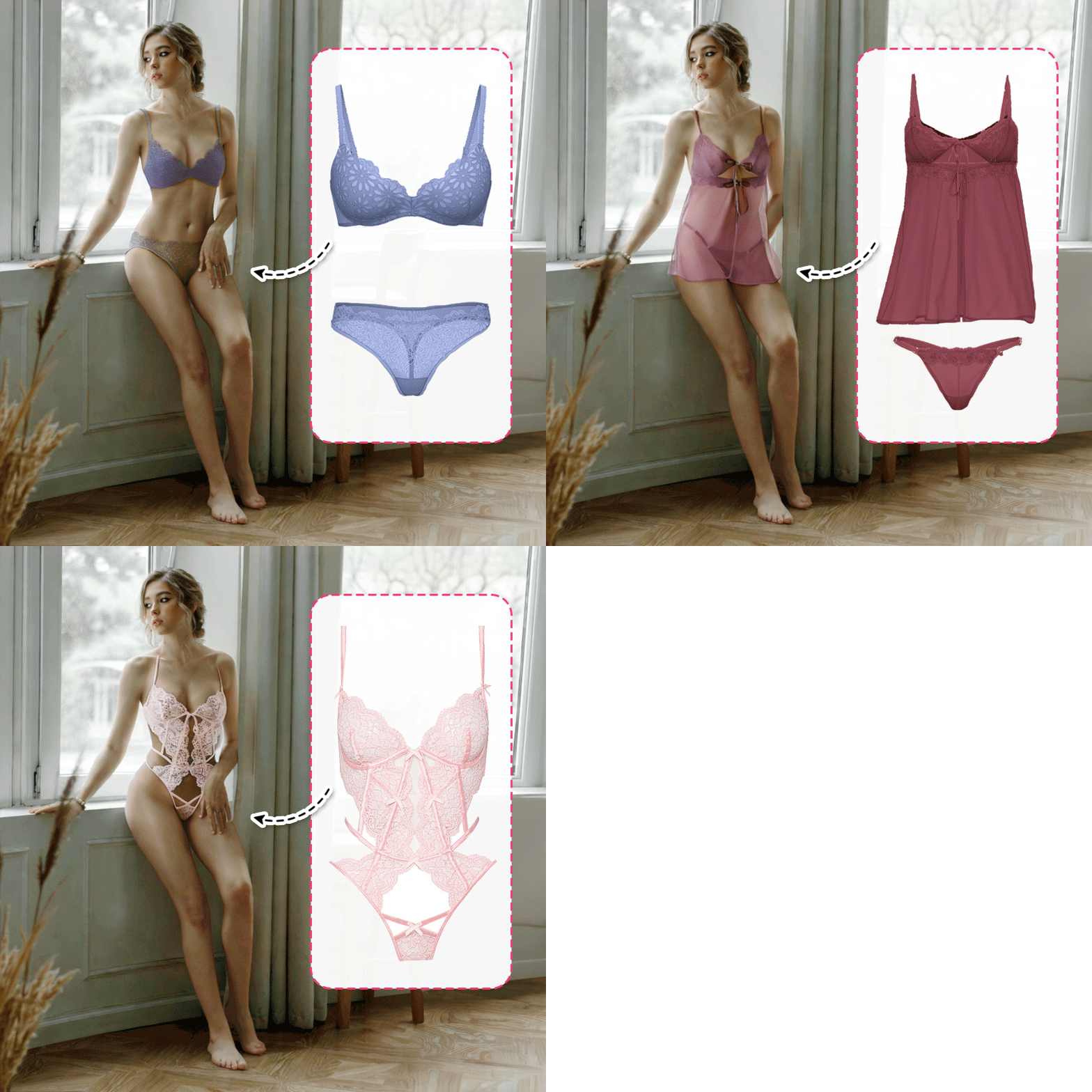
These tools are becoming popular in fashion tech apps and online editors, offering a safe and private way to explore new looks, styles, and fits before making a purchase.
Why Try On Lingerie Virtually?
Here’s why AI lingerie try-on is gaining popularity:
- Privacy: Try on intimate looks in a completely private setting.
- Confidence Boost: See what flatters your body before buying or styling.
- Style Discovery: Explore colors, cuts, and trends risk-free.
- No Physical Effort: No need to undress or physically try on anything.
For those curious about how a certain look might flatter their body, AI lingerie simulators make it easy to experiment safely and confidently.
How to Try On Lingerie with AI
Download Virtual Clothes Try On App
Download the YouCam Makeup app free in the App Store or Play Store.
Upload Your Photo
Tap on the AI Clothes feature. Upload a clear, full-body photo with good lighting for the best results. This ensures the AI can accurately apply the lingerie overlay.
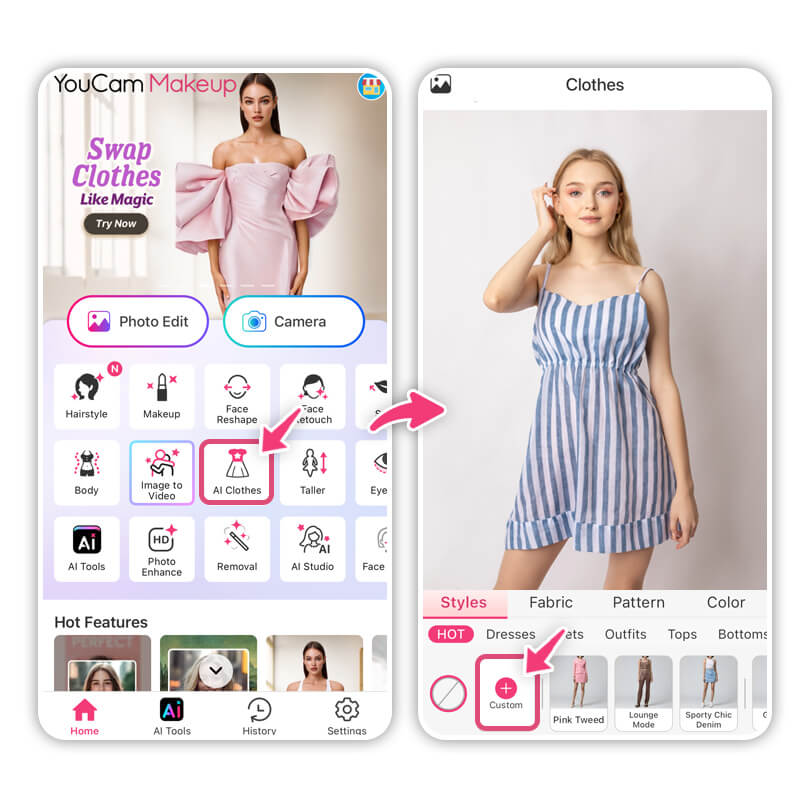
🧪 My test notes: My plain-wall, full-body photo in daylight worked far better than the photo in a busy room. Standing straight with arms slightly away from my body helped the lingerie shape follow my silhouette; crossed arms or a strong side angle made the result look pasted on.
Try On AI Lingerie
Upload a reference photo of the lingerie style you would like to try on. Make sure the photo includes a model wearing the clothing.
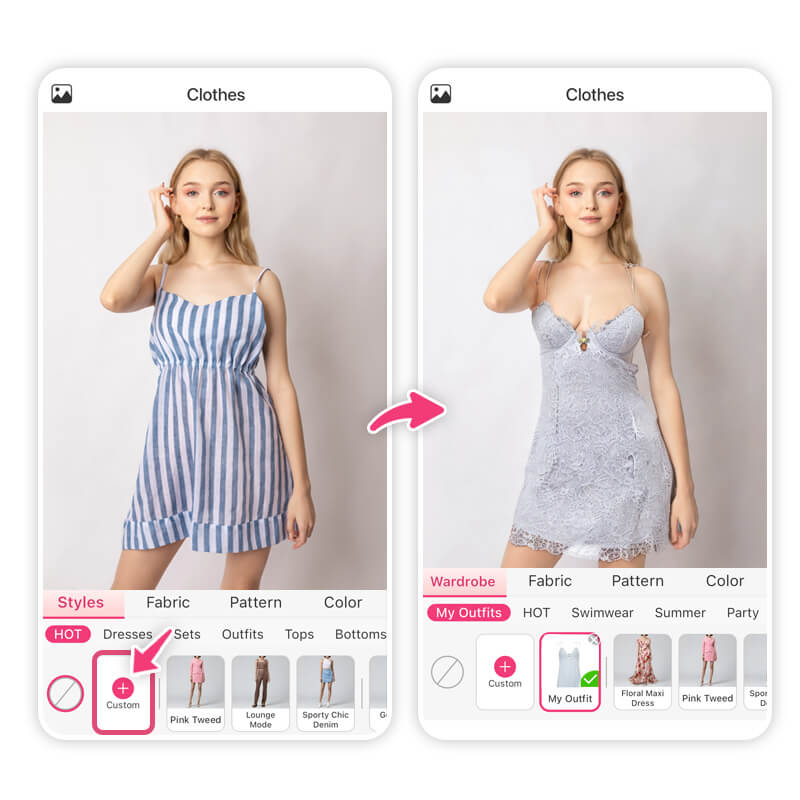
🧪 My test notes: The reference photo made the biggest difference. Front-facing product-style shots with a clean background came through with the clearest lace and strap details, while moody, heavily styled editorial images lost detail or looked blurry. If a result looks off, I'd swap the reference before re-shooting yourself.
See Your Virtual Lingerie Look
The app will automatically apply the chosen lingerie outfit to your image, matching your pose and lighting for a hyper-realistic result.
🧪 My test notes: I found the preview really useful for judging color against my skin tone and whether a silhouette felt like me. What it can't tell you is how a band fits, how a fabric feels, or how much support a style gives — I'd still check the brand's size chart before ordering.
Bonus: Change Lingerie Color
Want to see the same lingerie in a different color? Use the AI Clothes feature to easily change colors and find the shades that best match your skin tone or personal style.
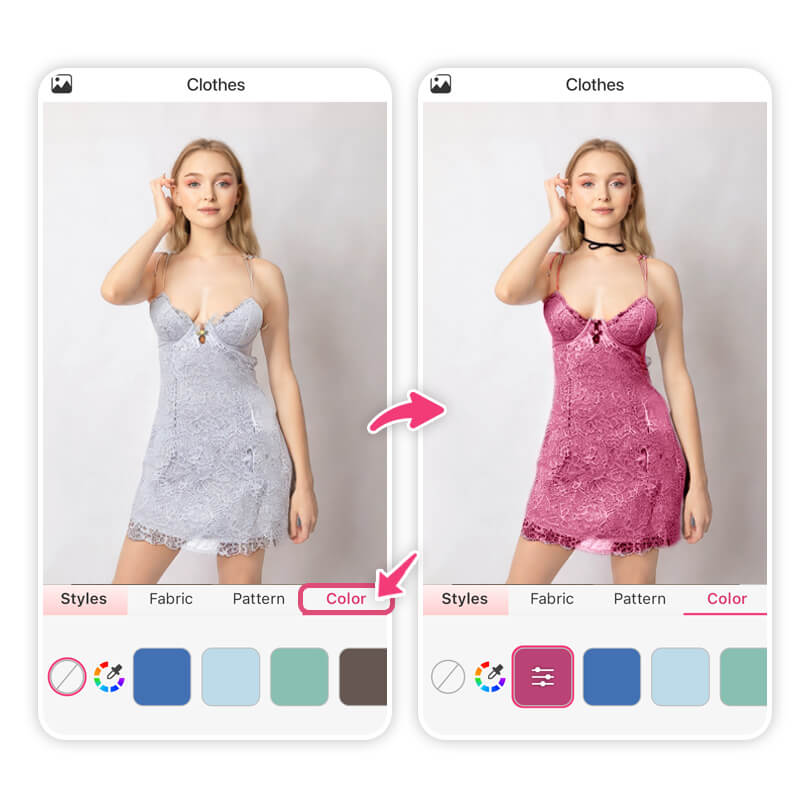
🧪 My test notes: Recoloring was my favorite part. A black satin set I liked looked softer in a deep burgundy and more everyday in a nude tone, and seeing them back-to-back made the choice obvious.
Best Styles to Try with AI Lingerie Filter
Here are a few trending styles users are trying on virtually:
- Lace Bralettes
- Satin Matching Sets
- Sheer Mesh Bodysuits
- Corset-Inspired Lingerie Tops
- High-Waisted Retro Sets
You can use the virtual try-on feature to see how these popular styles look on your body shape.
🧪 My test notes: Satin sets and lace bralettes looked the most realistic in my tests. Sheer mesh was trickier — the transparency didn't always read naturally — so I'd use it more for a general vibe check than a final decision.
Best Lingerie Styles for Each Body Type
Every body is unique and the right lingerie can highlight your best features while boosting your confidence. Here’s a quick guide to finding flattering styles based on your body type:
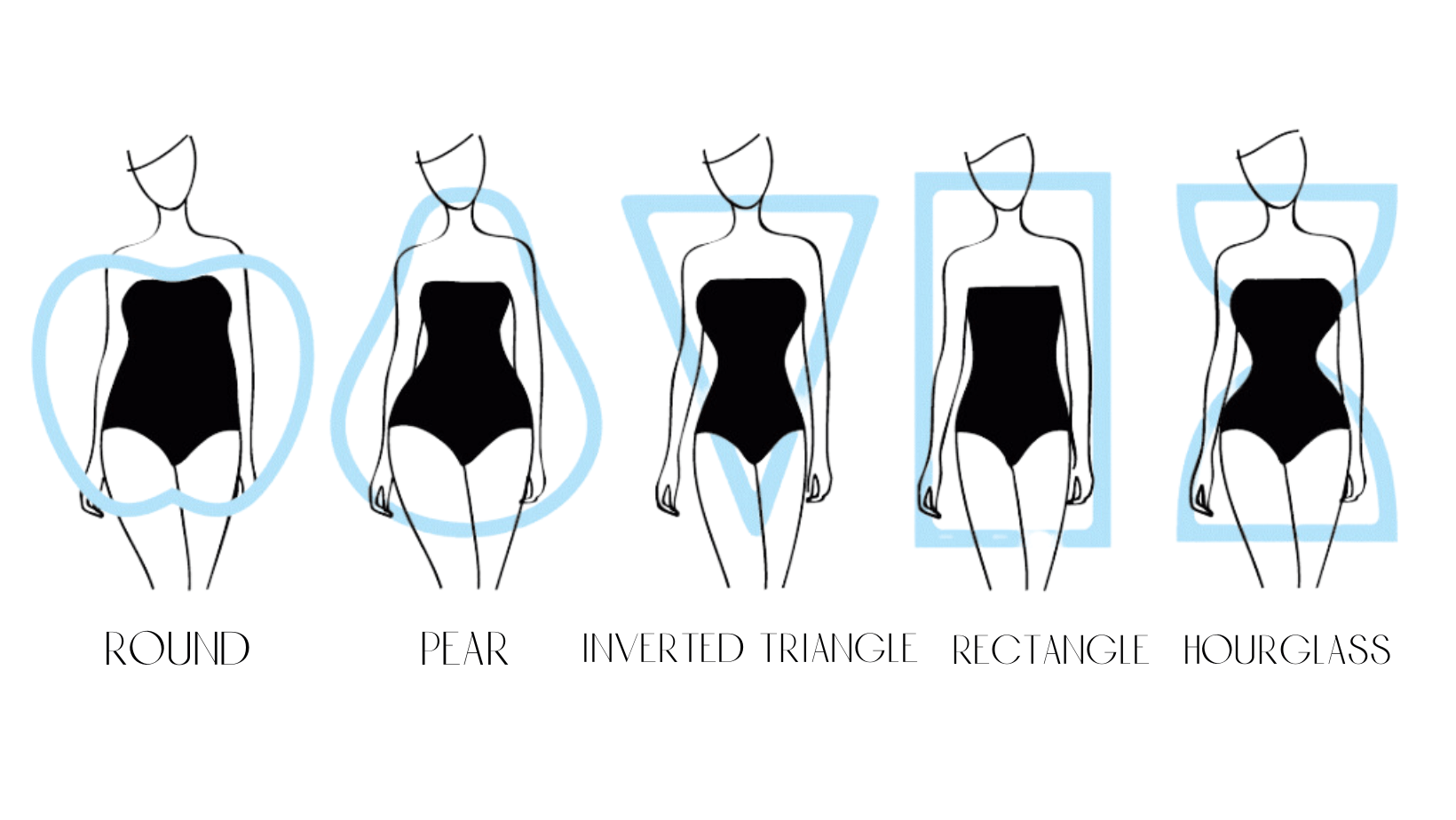
Source: Greenville Boudoir
Hourglass Shape
Balanced curves with a defined waist.
Best styles: Corset-inspired lingerie, high-waisted retro sets, and balconette bras enhance your natural proportions and support your curves beautifully.
Pear Shape
Wider hips with a smaller bust and waist.
Best styles: Look for bralettes or push-up styles to add volume up top. High-cut bottoms and sheer bodysuits help elongate the legs and balance your figure.
Apple Shape
Broader upper body and slimmer hips.
Best styles: Bodysuits with strategic cut-outs or deep V-necklines draw attention to your neckline and elongate your torso. Choose lingerie with structure to support your bust.
Rectangle Shape
Similar width throughout your bust, waist, and hips.
Best styles: Lingerie with ruffles, lace details, or contouring lines can create the illusion of curves. Try satin matching sets or corset tops that cinch the waist.
Inverted Triangle Shape
Broad shoulders and a narrower waist and hips.
Best styles: Opt for styles that add volume to the lower half, like high-waisted sets with lace or mesh accents. Bralettes with soft lines soften the upper body.
With AI lingerie try-on, you can test each of these styles in seconds to see which suits you best without the changing room stress.
🧪 My test notes: The body-type tips were a good starting point, but I'd treat them as suggestions, not rules. Trying one "recommended" style next to one I simply liked was more useful than following the guide strictly.
Try Lingerie Looks with AI Lingerie Try On
Shy about trying on lingerie in-stores? The future of fashion is virtual, and lingerie is no exception. With AI lingerie try-on tools, you can explore styles safely, confidently, and privately.
Whether you're shopping online or just curious how a certain style looks on you, virtual try-on gives you the freedom to experiment with no strings (or straps) attached.
Other Clothes Try-On Ideas
- AI Bikini Generator: Virtual Try On Bikinis for Free
- Virtual Wedding Dress Try-On: Try On Bridal Dresses Online
- Best Met Gala Looks Ever: Try On the Glam with Virtual Clothes
- 7 Best AI Clothes Changer Apps (2025)
- We Tried Google Doppl and This Is What We Think
AI Lingerie Try-On Compared: Which Option Is Best?
Here's how virtual try-on compares with the usual ways of shopping for lingerie.
| Option | Best For | My Verdict |
|---|---|---|
| AI Clothes try-on in YouCam Makeup | Previewing styles and colors privately on your own photo | My first step — quick and private for narrowing down a style |
| In-store fitting room | Checking fit, support, and fabric feel | Still the most accurate for fit, but less convenient |
| Ordering several sizes online | Trying at home with real garments | Accurate, but depends on return policies and takes time |
| Browsing product photos | Discovering new styles and brands | Great for ideas, but you only see them on a model |
Verdict: Use AI lingerie try-on to narrow down the style and color, then confirm size and fit with the brand's guide or a fitting.
What Real Users Say
Here's what App Store reviewers have said about YouCam Makeup and its AI features.
"The AI functions are better than any website AI apps i tried." — tehstev88, ★★★★★ (App Store review)
"They have added more features like the AI stuff and different backgrounds, etc. so I understand them wanting to make money from the use of all the new features." — DependOnAccurateInformation, ★☆☆☆☆ (App Store review)
Pro Tips for Better Results
- Shoot full-body in even light: Stand facing the camera by a window or under soft light, with the whole torso in frame.
- Wear fitted basics: A fitted tank or bodysuit gives the AI a clearer outline than loose, layered clothing.
- Use a plain background: A clean wall keeps the focus on your silhouette and reduces odd edges.
- Choose clear references: Pick front-facing lingerie photos with visible straps, lace, and seams.
- Test colorways: Recolor a style you like before deciding against it — color often changes the whole impression.
- Keep it private: Use a photo you're comfortable uploading and review the app's privacy settings before you start.
New for Fall 2026: The Lace-Trim Lingerie Top
Lingerie-inspired tops are having a moment again, with silk and satin camisoles trimmed in lace being styled as everyday outerwear for coquette, boho, and Y2K-inspired looks (Source: Coveteur, August 20, 2026). It's an easy trend to preview first — try a lace-trim cami reference on your own photo before you buy.
Want to try more looks? Explore the AI Clothes Try-On feature or finish the look with makeup and beauty filters in YouCam Makeup.
About the Editors
The PERFECT Corp. Editorial Team
We are a team of experts on photo and video editing apps. Our goal is to deliver engaging content on everything from stunning selfie edits to eye-catching video effects. We cover the latest trends and share niche tips to help you master digital creation.
AI Lingerie FAQs
What is AI lingerie?

AI lingerie refers to virtual try-on technology that allows users to preview lingerie looks on themselves using artificial intelligence. It helps visualize styles without physical try-ons.
Can I see what I look like in lingerie using AI?
Yes, with AI try-on tools like YouCam Makeup’s AI Clothes feature, you can preview lingerie-style outfits virtually and realistically using just a photo.
Is there an app to try on lingerie virtually?
YouCam Makeup is one of the leading apps that lets you try on virtual clothes, including lingerie-inspired outfits, using AI. It’s available online and as a mobile app.
Is AI lingerie try-on free?
Yes, most apps like YouCam Makeup offer free virtual try-on features. Some premium styles or filters may require an upgrade, but basic tools are often free to use.
Is using an AI lingerie try-on tool safe?
It’s safe as long as you use trusted, ethical platforms. Be sure to avoid uploading private or explicit images and never use these tools for others without consent.



 English


