 Author:


You're scrolling through social media when you spot a gorgeous makeup look, a trendy hairstyle, or an outfit you instantly want to recreate. Instead of wondering whether it will suit you—or buying products you'll never use—you can now preview your entire beauty transformation with AI before making any decisions.

YouCam Makeup: Best Makeup Selfie Editor App
YouCam Makeup is more than a virtual makeup app, it's your personal AI beauty assistant.

Powered by advanced AI technology, YouCam Makeup analyzes your facial features and helps you instantly preview realistic makeup, hairstyles, and fashion combinations that complement your unique look. Simply upload a selfie or chat with the AI Beauty Agent to create customized beauty transformations in seconds.
Trusted by over 500 million users worldwide, YouCam Makeup lets you:
- Instantly try on realistic makeup looks
- Experiment with different hairstyles before committing to a cut
- Preview complete outfit ideas that match your beauty style
- Virtually test foundation, lipstick, blush, eyeliner, contacts, and more
- Retouch selfies with professional-quality AI editing tools
Whether you're preparing for a special occasion or simply looking for fresh inspiration, YouCam Makeup makes discovering your next favorite look easier than ever.
How to Use YouCam Makeup App Like A Pro
Instead of trying beauty products one by one, YouCam Makeup lets you create a complete makeover in just a few taps.
In this guide, you'll discover how to use the app to:
- Find your perfect eye makeup
- Explore trending makeup styles
- Discover your best foundation and contour
- Find flattering lip colors
- Retouch selfies naturally
- Create complete AI style transformations with makeup, hairstyle, and outfit recommendations
Whether you're experimenting with everyday beauty or recreating the latest viral trends, these features help you build a personalized look in minutes.
| Table of Contents |
|---|
#1 Find Perfect Eye Makeup

From eyeliner and eyeshadow to eyebrows and eye color, every feature is powered by realistic AI technology that adapts naturally to your facial features.
1. Try Any Eyeliner Style Instantly
Finding the perfect eyeliner style doesn't have to involve endless practice. With YouCam Makeup, you can instantly preview everything from classic winged eyeliner and soft puppy liner to dramatic graphic looks in real time.
See which eyeliner best complements your eye shape before recreating it in real life.
Read More>> How to Master The Best Winged Eyeliner for Your Eye Shape
2. Experiment with Eyeshadow Colors
Whether you love natural neutrals or colorful statement makeup, YouCam Makeup makes it easy to test hundreds of eyeshadow shades and finishes. Mix and match colors to discover combinations that complement your eye color, skin tone, and personal style.
Explore everything from soft everyday looks to glamorous evening makeup in seconds.
Read More >> Colorful Eye Shadow Looks: Which Style Suits You?
3. Find Your Perfect Eyebrow Shape
The right eyebrow shape can completely change the balance of your face. Before booking your next brow appointment, preview different brow thicknesses, arches, and styles with AI to discover the shape that flatters your facial features best.
Whether you prefer natural fluffy brows or defined sculpted arches, finding your perfect match has never been easier.
Read More >> How to Find the Best Eyebrow Shape for 6 Major Face Shapes
4. Try Different Eye Colors
Curious how you'd look with hazel, gray, blue, or green eyes? Instantly preview realistic eye colors and contact lens styles using AI. Experiment with subtle enhancements or bold transformations while maintaining natural-looking details.
It's the easiest way to explore a completely new look without wearing colored contacts.
Read more>> How to Do Cosplay Makeup in 5 Easy Steps
#2 Explore Different Makeup Styles
Beauty trends evolve faster than ever, and trying every new look in real life can quickly become expensive and time-consuming.

1. Create Complete AI Style Makeovers
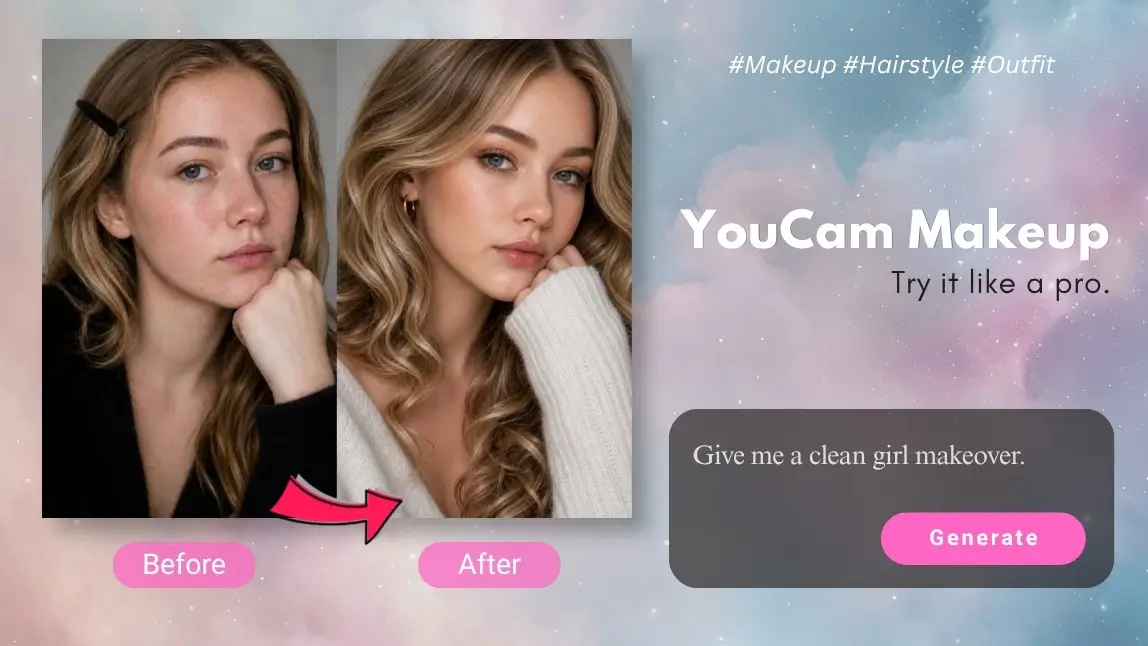
Instead of applying makeup one product at a time, simply tell the AI Beauty Agent what you're looking for. Want a clean girl aesthetic, soft glam makeup, Korean office look, or old money style? Just type your idea, upload a selfie, and watch AI generate a complete makeover within seconds.
Your personalized transformation can include:
- Makeup recommendations
- Matching hairstyles
- Coordinated outfit ideas
- Accessories that complete your look
It's the easiest way to visualize an entirely new style before trying it in real life.
2. Discover Trending Makeup Looks
From timeless classics to viral beauty trends, YouCam Makeup helps you experiment with today's most popular makeup aesthetics in just a few taps. Instead of following complicated tutorials, preview each look instantly and find the one that best matches your features and personal style.
Read More>> What Is Y3K Beauty? Futuristic Makeup Trend Explained
3. Match Your Makeup with Hairstyles
A beautiful makeup look becomes even more stunning when paired with the right hairstyle. With YouCam Makeup, you can experiment with different hair lengths, colors, bangs, and styling options alongside your makeup to see which combinations complement your face shape and overall aesthetic. Whether you're considering curtain bangs, long waves, a sleek bob, or a trendy butterfly cut, AI lets you preview your next hairstyle before making a permanent change.
Read More>> AI Hair Color Changer: Try On Any Hair Color Before You Dye
#3 Discover Foundation & Contour
A flawless makeup look starts with the perfect base. Choosing the right foundation shade and contour placement helps create a natural, polished finish while enhancing your unique facial features.

With AI-powered skin analysis, YouCam Makeup makes finding your perfect complexion products easier than ever.
1. Find Your Perfect Foundation Match
Finding the right foundation can be challenging, especially when shopping online. YouCam Makeup uses advanced AI technology to analyze your skin tone and recommend foundation shades that blend naturally with your complexion. Compare different shades instantly, discover your best match, and shop with greater confidence—all before making a purchase.
Read more>> How to Find Your Foundation Shade Match: Three Expert Tips
2. Contour, Highlight & Blush Like a Pro
Small changes in contour and blush placement can completely transform your face shape. With YouCam Makeup, you can instantly experiment with different contour intensities, highlight placements, and blush colors to discover the techniques that best enhance your natural features. Whether you prefer a soft everyday glow or a sculpted evening look, AI lets you compare multiple styles in seconds.
Read more>> How To Find The Best Blush Color According to Your Skin Tone
3. Conceal Imperfections Naturally
Need to cover dark circles, blemishes, or redness? YouCam Makeup's AI Concealer tool helps you create a smooth, natural-looking complexion while preserving realistic skin texture. Instantly preview how different concealer shades blend with your skin before choosing the products that work best for you.
#4 Glam Your Lips
The perfect lip color can instantly transform your entire makeup look. Whether you're searching for an everyday nude lipstick, a bold statement red, or the latest trending lip shade, YouCam Makeup lets you preview hundreds of colors before buying a single product.

From subtle everyday styles to glamorous evening looks, you can experiment with different shades, finishes, and lip effects in just a few taps.
1. Find Your Perfect Lip Color
Choosing the right lipstick isn't just about picking your favorite color—it's about finding the shade that complements your skin tone, makeup style, and overall look.
With YouCam Makeup, you can instantly try on hundreds of lipstick shades from natural nudes to vibrant reds and trendy browns. Compare colors side by side and discover which shades flatter you most before shopping online or in-store.
Whether you're creating a fresh everyday look or getting ready for a special event, finding your signature lip color has never been easier.
Read More>> How to Pick the Best Nude Lipsticks for Your Skin Tone
2. Explore Different Lip Finishes
The finish of your lipstick can completely change the mood of your makeup.
Experiment with matte, glossy, satin, shimmer, and velvet finishes to see how each texture complements your overall look. AI previews every finish with realistic lighting and lip details, making it easy to choose the perfect style for any occasion.
Whether you love a soft natural finish or ultra-glossy lips, YouCam Makeup lets you compare every option instantly.
3. Create Trendy Lip Looks
Want to recreate the latest lip trends without watching countless tutorials?
Use YouCam Makeup to experiment with today's most popular lip styles, including Korean gradient lips, glossy glass lips, blurred lips, and bold statement colors. Instantly preview different looks and discover which one best matches your makeup style.
#5 Snap A Flawless Selfie
After creating your perfect makeup look, it's time to capture it. YouCam Makeup includes AI-powered selfie editing tools that help enhance your natural beauty while keeping every photo realistic.

1. Brighten Your Smile Naturally
A confident smile can instantly elevate any selfie. Use AI to whiten your teeth naturally and brighten your smile without making your photo look artificial. Whether you're sharing photos on social media or updating your profile picture, a subtle enhancement can make all the difference.
Try Now>> Teeth Whitening: The Best App to Instantly Whiten Your Smile
2. Retouch Natural-Looking
Need a quick touch-up before posting? Smooth blemishes, reduce dark circles, soften skin texture, and enhance facial details while maintaining a realistic appearance. Unlike heavy beauty filters, YouCam Makeup preserves your natural features so your photos still look like you—just refreshed.
Perfect for everyday selfies, professional headshots, or special occasions.
Read More>> 6 Major Face Editing App Tools You Must Know
🔥 NEW: Transform Your Overall Look with AI
Beauty is about more than just makeup—it's about creating a complete look that reflects your personality. With YouCam Makeup's AI Beauty Agent, you can transform your makeup, hairstyle, and outfit together in seconds using just one selfie and a simple text prompt.

1. Chat with Your AI Beauty Agent
Simply describe the look you want, and let AI do the rest. Try prompts like:
"Create a clean girl look."
"Give me a Korean office makeover."
"Style me with soft glam makeup."
"Show me an old money aesthetic."
Within seconds, AI generates a coordinated beauty transformation complete with makeup, hairstyle, and outfit suggestions tailored to your photo.
2. Preview Complete Looks Before You Commit
Thinking about changing your hair color, updating your wardrobe, or experimenting with a bold makeup trend?
Instead of imagining how everything will look together, preview your complete transformation instantly. Mix and match different beauty styles, hairstyles, and outfits until you discover the look that feels most like you.
It's the easiest way to explore new styles with confidence—without the commitment.
Have Fun Trying the Best AI Makeup App Today!
From realistic virtual makeup try-ons to AI-powered hairstyle and outfit transformations, YouCam Makeup makes it easy to explore every version of your style in one app. Whether you're discovering your signature makeup look, planning your next haircut, or refreshing your wardrobe, YouCam Makeup helps you visualize every possibility before making a change.
Download YouCam Makeup today and start creating personalized makeup, hairstyle, and outfit transformations with AI.