


 Author: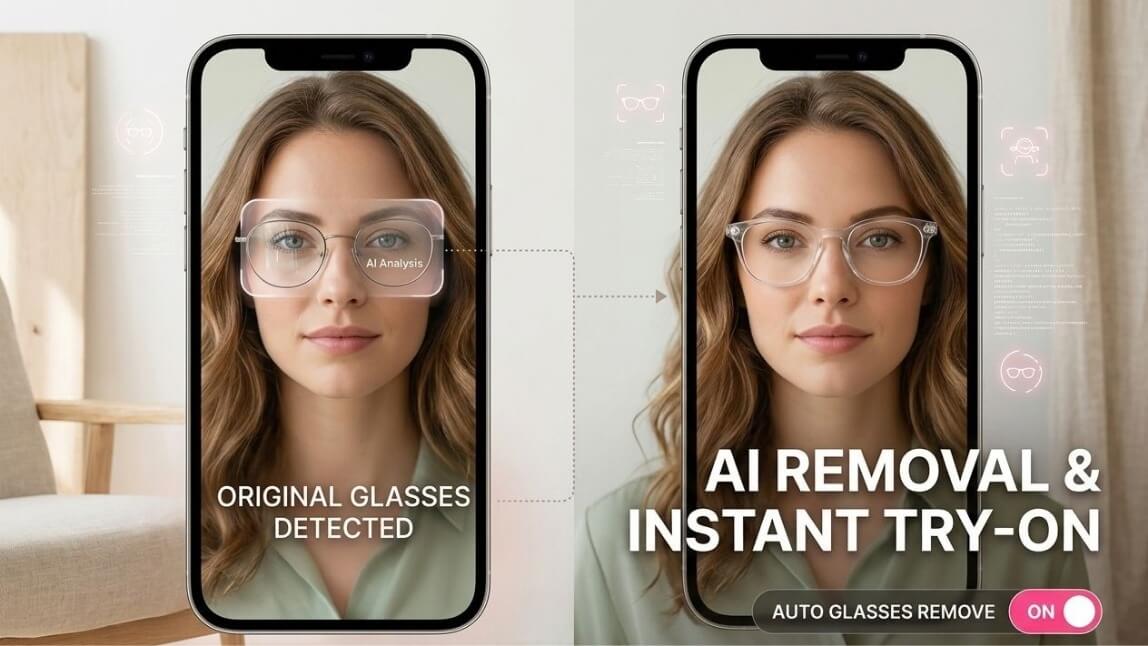
Here's the awkward truth about eyewear shopping: most people buying glasses already wear glasses. So they take theirs off to try a new pair, and then they can't see the new pair. Great system.
Virtual try-on was supposed to fix that, but a new frame stacked on top of the old one just looks like a very confused face. Our glasses virtual try-on now ships with AI Glasses Removal, which erases a shopper's real glasses before the new frames go on.
*Images designed by YouCam AI
Highlight of This Release:
What AI Glasses Removal actually does
The feature uses AI to digitally erase the glasses a shopper is physically wearing, then applies the frames they want to try. What they see is their own face with only the new pair on it, no ghost of the old prescription lurking underneath.
For the shopper, it's one toggle: "Wearing glasses? Turn this on so we can digitally remove them before your try-on." No settings to fiddle with, no instructions to read.
Live camera or photo: two ways in
Real-time, on the live camera feed
Glasses Removal runs in real time on the live camera, so shoppers can turn their head and browse frames as if standing at a mirror. It works alongside the automated pupillary distance (PD) detection and high-precision face mapping already in the try-on, so new frames still sit where they should.
From an uploaded photo
Shoppers can upload a photo instead, and the removal works on that too.
Why this matters for eyewear retailers
Your most valuable eyewear customers are the ones who need glasses every day: nearsighted shoppers and prescription wearers. They are also the ones the classic try-on served worst, since taking their glasses off means shopping blurry.
Glasses Removal lets them compare frames with their eyes open, literally. That means more confident picks and less hesitation between "add to cart" and "maybe later."
It also travels with the rest of the solution. The same try-on deploys across your website, mobile app, social channels and in-store kiosks, so the feature shows up wherever your shoppers do.
Try-on before vs. after Glasses Removal
| Before | With AI Glasses Removal | |
|---|---|---|
| Shopper already wearing glasses | Takes them off and squints, or sees two frames stacked | Real glasses erased, only the new frame shows |
| Input | Live camera or photo | Live camera or photo, removal applied to both |
| Speed | Real-time try-on | Still real-time |
| Shopper effort | Workarounds | One toggle |
| Best-served audience | People who don't wear glasses | Everyone, including prescription wearers |
How to get it on your store
Try it with your own glasses on first. Open the glasses try-on demo store, pick a frame, and flip on Remove Glasses.
Setting up your catalog is light work too. Each virtual eyewear SKU needs only 3 images, you preview it instantly in the AR editor, then publish across channels. Frame color, size and reflection, plus lens tint, density and reflection, are all adjustable.
Want to see how it fits alongside our other try-on tools? Browse Perfect Corp's AI solutions or see live examples in our showcase.
FAQ
Do shoppers need to take their glasses off to use virtual try-on?
No. With Glasses Removal switched on, the AI erases their real glasses from the image before applying new frames.
Does it work on photos as well as live video?
Yes. It runs in real time on the live camera feed and also works on uploaded photos.
Which shoppers benefit most?
Nearsighted shoppers and anyone who wears prescription glasses, since they can now see clearly while comparing new frames.
Where can I deploy it?
Anywhere the glasses virtual try-on runs: your website, mobile app, social channels and in-store kiosks.



 English


