 Author:


Ask most AI agents to check your skin for fine lines, suggest a hairstyle for your face shape, or put a jacket on your photo, and you will get an light result instead of an deep-analyzed answer. That gap between "generic chatbot" and "actual beauty expert" is exactly what YouCam API now closes with AI Agent Skills.
Instead of writing your own client for authentication, endpoint versions, and JSON schemas, you install a self-contained Skill and your agent can run real skin, hair, and style analysis the moment a user asks.
Highlight of This Release:
What YouCam API Agent Skills Actually Do
YouCam API already powers beauty, hair, skin, and virtual try-on features across some of the biggest names in beauty tech. That same intelligence now ships as ready-to-install Agent Skills, the same packaging format tools like Claude Code and Codex use to extend what an AI agent can actually do.
Install a Skill and your agent gains a new ability on the spot. Ask it to analyze a selfie for skin concerns, and it calls the right endpoint, reads the result, and hands back a plain-language report.
There is no SDK to vendor into your own codebase and no auth flow to debug. The Skill already knows how to talk to YouCam API. You just bring the photo and the question.
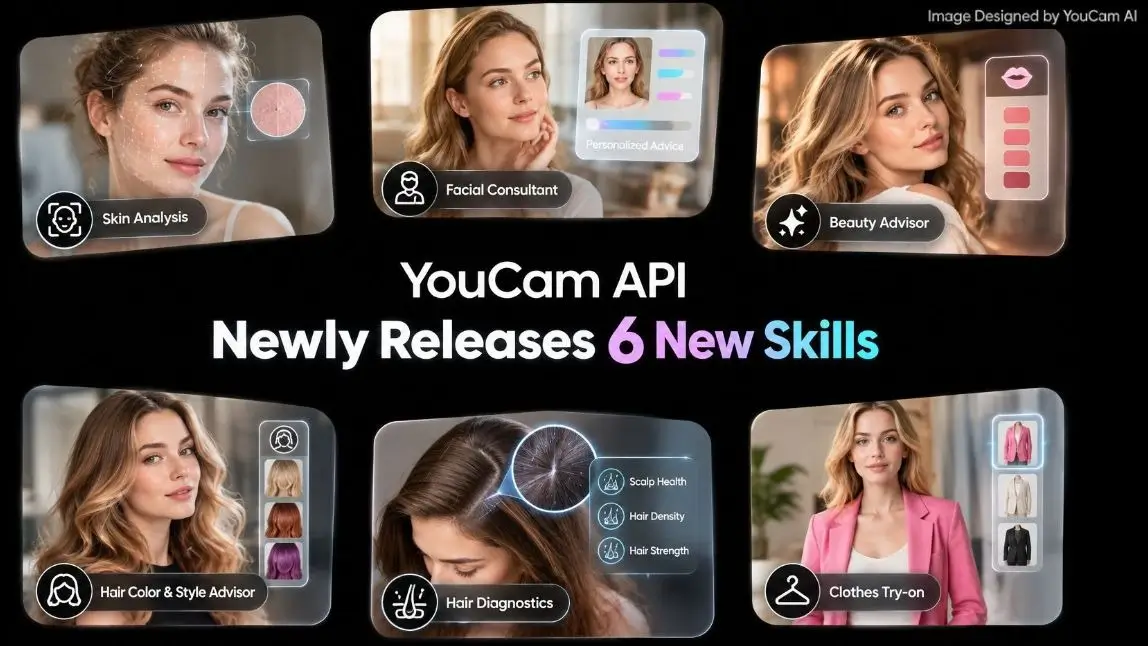
Six Skills, Six Real Jobs
Each Skill is scoped to one situation, so your agent triggers the right one instead of guessing. Here is what ships in the first batch.
Skin Analysis Expert
Runs a full skin health readout across sixteen tracked conditions, wrinkles, pores, redness, dark circles, and more, then explains what the results mean instead of just handing back a score. That depth is the check most beauty skills stop short of.
Facial Consultant
Reads skin tone and facial features in one pass. It is the foundation every other recommendation, makeup, hair color, styling, needs to be accurate instead of generic.
Beauty Advisor
Combines face shape and skin tone analysis with virtual makeup try-on, so your agent can suggest a look and preview it on the user's own photo in the same reply.
Hair Color & Style Advisor
Matches hairstyle and hair color recommendations to face shape and skin tone, then renders the result. No more asking a user to imagine how bangs would look on them.
Hair Diagnostics
Checks density, type, frizziness, and length in a single report, useful for any hair care or product recommendation flow.
Clothes Try-on Studio
Puts an outfit on a photo with options for turning the pose, walking motion, and background swap, handy for virtual fitting rooms and lookbook generation alike.
Built to Never Go Stale
Most integrations break the moment an API renames a parameter or adds a new field. YouCam API Skills work differently. Each one reads the live API documentation at the moment it runs, so it always pulls whatever the current endpoint actually expects.
A parameter rename or a new response field gets absorbed automatically, even on a Skill you installed months ago. You are never stuck waiting on a version bump to reach your disk.
If the live docs are ever unreachable, the Skill falls back to a bundled, monthly-updated offline spec, so a dropped connection never means a broken call.
How to Install a Skill
YouCam API Skills are built for AI agent platforms including Claude Code, Claude Desktop, and Codex. Installing one takes a single command.
npx skills add YouCam-API/youcam-skills-test --skill beauty-advisorLeave off the --skill flag to see the full list and choose interactively. Each Skill asks for a YouCam API key, set once as an environment variable, and every Skill on your machine can reuse it.
Explore the underlying endpoints yourself in the YouCam API Playground.
Building It Yourself vs. Installing a Skill
| DIY API Integration | YouCam API Agent Skill | |
|---|---|---|
| Setup | Read docs, write request handlers, manage auth | One install command |
| Keeping up with API changes | Manual, you re-test every update | Automatic, reads live docs at runtime |
| Offline resilience | You build your own fallback | Built-in, monthly-updated fallback spec |
| Scope | You decide which endpoints to wire up | Pre-scoped to one real use case per Skill |
| Time to first result | Days | Minutes |
FAQ
Do I need a YouCam API account to use a Skill?
Yes. Each Skill needs a YouCam API key, set once as an environment variable, to authenticate its calls.
Will an installed Skill break when YouCam API updates?
Not for parameter or schema changes. Skills read the live documentation at runtime, so most API updates get absorbed automatically. Larger changes to a Skill's own logic still arrive through a normal update in your platform's install flow.
Which AI agent platforms are supported?
Claude Code, Claude Desktop, and Codex are supported today, with more platforms planned.
Can I install just one Skill instead of all six?
Yes. The install command takes a --skill flag so you can add exactly the one you need.
Is there an offline mode?
Yes. If a Skill cannot reach the live documentation, it falls back to a bundled spec that is refreshed monthly.
Try It in Your Own Agent
Install your first Skill from the YouCam API Skills and give your agent a real beauty consultant in the time it takes to run one command. Curious what else YouCam API can do first? Explore the full API Playground or see how other builders use it in our discord.