 Author:


Type "claude image generation" into Google and you'll get the same answer from a dozen different blogs: Claude can't do it.
But, in 2026, this guide walks through exactly how to set that up, plus a bonus method for having Claude Cowork build you a full local image generator tool in a single prompt. Fifteen minutes, start to finish.
Step 1: Open Claude
Open Claude and go to the Cowork interface.

Step 2: Grab Your Free YouCam API Key
Head to the YouCam AI API page, sign up, and copy your API key.

You'll get 40 free credits immediately, enough to test text to image and image to image generation without entering a card number.
Step 3: Paste Prompt
The prompt is already prepared for you below and is compatible with both Mac and Windows. It will instantly build a mini-tool that you can easily access straight from your desktop.

Prompt starts ------------------------
YouCam AI Image Generator (local tool)
Batch AI image generation using Perfect Corp's YouCam API (text-to-image/youcam). Runs entirely on your own machine — your API key never touches disk.
Run it
- macOS: double-click
start-mac.command. - Windows: double-click
start-windows.bat. First run installs dependencies automatically (using a project-local npm cache), then openshttp://localhost:3939in your browser.
Use it
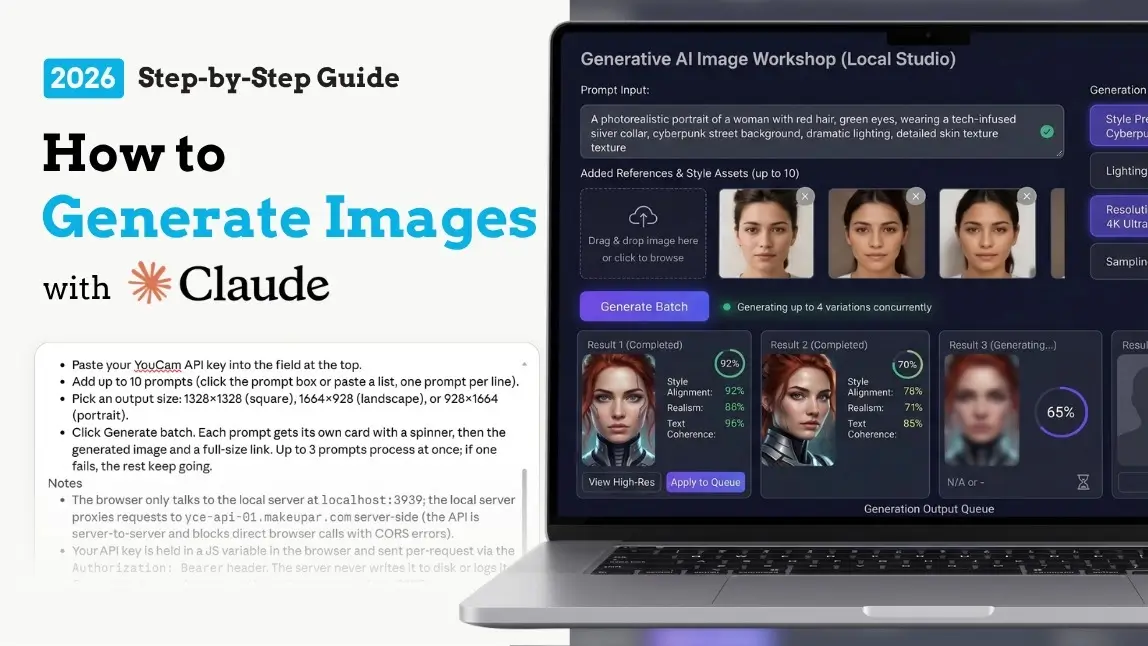
- Paste your YouCam API key into the field at the top.
- Add up to 10 prompts (click the prompt box or paste a list, one prompt per line).
- Pick an output size: 1328×1328 (square), 1664×928 (landscape), or 928×1664 (portrait).
- Click Generate batch. Each prompt gets its own card with a spinner, then the generated image and a full-size link. Up to 3 prompts process at once; if one fails, the rest keep going.
Notes
- The browser only talks to the local server at
localhost:3939; the local server proxies requests toyce-api-01.makeupar.comserver-side (the API is server-to-server and blocks direct browser calls with CORS errors). - Your API key is held in a JS variable in the browser and sent per-request via the
Authorization: Bearerheader. The server never writes it to disk or logs it. - Generation is asynchronous — the tool creates a task via
POST /s2s/v2.0/task/text-to-image/youcam, then pollsGET /s2s/v2.0/task/text-to-image/youcam/{task_id}until each image finishes rendering.
Prompt ends ------------------------
Questions? Reach out to our sales team: https://www.perfectcorp.com/business/contact-us/salesStep 4: Done
Claude builds a small local app you run with a double click, similar to the batch photo enhancer Perfect Corp walked through in an earlier tutorial.
Paste your key, type a prompt, and you have a private, reusable image generation tool running on your own machine in minutes.
Prompt Tips for Better Results to Generate Images
Claude is genuinely good at refining prompts, but a little structure up front saves you a few rounds of back and forth.
Name the format first.
"Product photo," "editorial illustration," or "cinematic still" sets the tone before anything else.
Describe light and mood, not just objects.
"Soft morning light" or "moody, high contrast" changes the result more than adding extra nouns.
Give Claude your brand details once.
Colors, tone, and past images that worked well. Claude carries that context into every prompt it sends afterward, so you're not repeating yourself.
Ask for variations, not restarts.
"Give me three lighting variations of this" gets you options in one pass instead of three separate conversations.
Be specific about aspect ratio.
Square for social, wide for banners, portrait for mobile. Say it up front and skip the recrop.
Real Use Cases for Businesses
Once the connection is live, the use cases go well past a single fun image:
Product photography concepts.
Generate placement mockups before a real photoshoot, or fill gaps for products that haven't shipped yet.

Marketing and social assets.
On brand graphics for a campaign, generated in batches instead of one at a time.

Presentation and pitch visuals.
Custom imagery for a deck instead of stock photos that every competitor is also using.
Rapid concept testing.
Try five visual directions for a campaign before committing budget to a single one.
Text to Image vs Image to Image: Which Should You Use with Claude?
| Mode | Best for | Example prompt |
|---|---|---|
| Text to image | Starting from a blank page: concepts, marketing visuals, mockups | "A cozy autumn coffee shop interior, warm tones, wide shot" |
| Image to image | Editing or restyling an existing photo while keeping its structure | "Take this product photo and place it on a beach at sunset" |
Why Use Claude and YouCam Instead of Prompting an Image Generator Directly?
| The old way | The Claude and YouCam way |
|---|---|
| Write your own prompt, hope it works, repeat | Claude refines the prompt for you and iterates on request |
| Juggle separate accounts for chat and image tools | One conversation handles reasoning and generation together |
| Paid software before you've tested quality | Free API credits to try it before you commit |
Beyond Generation: What Else Comes with the Same Connection
One detail that gets buried in most "how to generate images with Claude" guides: connecting Claude to the YouCam API doesn't just hand it one generation tool. It hands it the whole toolbox. Once the connector is live, Claude can also call on:
- AI Photo Background Change, swap a background entirely or generate a new setting from a text prompt.
- AI Object Removal, clean unwanted elements out of a generated or uploaded image.
- AI Photo Enhance, sharpen and upscale an image after it's generated, useful when you need a larger final file.
- AI Image Extender, expand a generated image to fit a new aspect ratio without starting over.
- AI Color Correction and Photo Lighting, polish tone and exposure on the final result.
Two Things Most Guides Won't Tell You
1. Ask for Batches
Because the connection lives inside Claude Cowork, you can ask for batches. "Generate ten variations of this product shot in different lighting styles" or "create five social media graphics from this brand brief" turns into one prompt instead of ten separate sessions.

For marketing teams producing recurring visual assets, that's the actual time savings, not the novelty of a single generated image.
2. Your data doesn't sit around after the fact
A fair question when connecting any AI agent to an image API: where do the photos and prompts go? Perfect Corp states that uploaded images are deleted, and when a tool is built through Claude Cowork, your API key stays in browser memory only, sent per request, never written to disk or logged.
Want to see the range of what the underlying engine can produce? Browse the YouCam AI API showcase for real examples across styles and use cases.
FAQ: Claude and Image Generation
Can Claude generate images?
Not natively. Claude has no built in text to image model. But connect it to an image generation API like YouCam's through MCP, and Claude can generate, edit, and iterate on images directly inside your conversation.
Why can't Claude generate images on its own?
Claude is a language model built for text understanding, reasoning, and vision analysis. Image generation from text requires a diffusion model, a fundamentally different architecture. Anthropic has focused Claude's development on reasoning and safety rather than bolting on a separate image generation system.
Is there a free way to generate images with Claude?
Yes. Signing up for a YouCam API key gets you free credits to generate images through Claude right away, no credit card required to start.
Do I need to know how to code to connect Claude to an image generator?
No. It is a one time setup in Claude's settings. After that, you generate images by typing normal prompts. If you want a dedicated local tool instead, Claude Cowork can build one from a single plain language prompt.
Can Claude edit an existing photo, not just create new ones?
Yes. The YouCam API's image to image mode lets Claude take an uploaded photo and restyle, recompose, or place it in a new setting while keeping its core structure intact.
Will Anthropic add native image generation to Claude?
There's no official announcement of native image generation for Claude. Anthropic's public guidance still points to SVG, diagrams, and MCP based integrations as the supported paths for visual output.
Is my API key safe when I connect Claude to an image generation tool?
When using a locally built tool through Claude Cowork, the key is held in browser memory only and sent per request, never written to disk. Uploaded images are removed from Perfect Corp's servers.
Can I use Claude generated images commercially?
Check the licensing terms of whichever API or model you connect. Perfect Corp's YouCam API is built for commercial use cases, including e-commerce, marketing, and product content, with usage covered under its API terms.
What's the difference between Claude analyzing an image and Claude generating one?
Analysis is native. Claude's vision capability lets it look at an uploaded photo and describe, extract, or reason about what's in it, no extra setup required. Generation is not native. It requires an external model, which is what the YouCam API provides.
Does this work in Claude Cowork specifically, or only claude.ai?
Both. In claude.ai or Claude Desktop, the MCP connector lets you generate images mid conversation. In Claude Cowork, you can go further and have Claude build a standalone local tool around the same API, which is handy if you want a repeatable interface instead of chatting for every image.
Ready to try it? Sign up for the YouCam AI API, grab your free credits, and generate your first image with Claude before your coffee gets cold.