 Author:



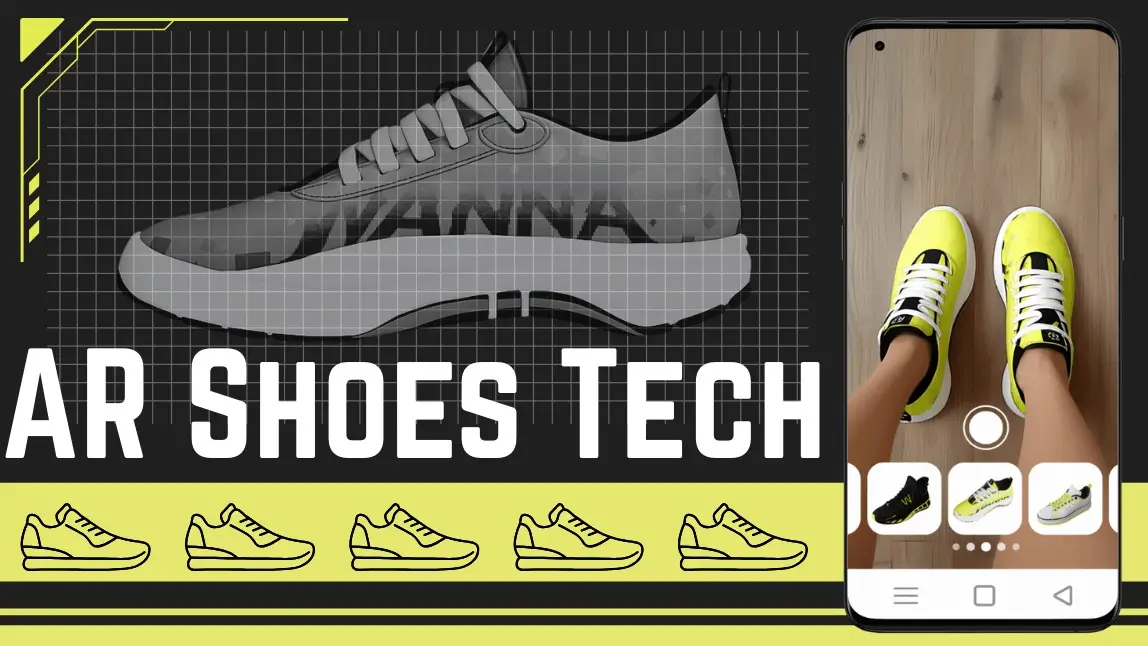
AR shoe try-on works in four steps: the phone camera detects the shopper's feet, computer vision tracks their position and angle frame by frame, a 3D model of the shoe is rendered on top with realistic materials and lighting, and the experience is delivered in the browser or a brand app, right next to the "add to cart" button.
This tech deep-dive explains each step for ecommerce, product and engineering teams: how foot tracking works, what makes a virtual shoe look real, where the 3D shoe models come from, how WebAR compares with an app, and what a rollout looks like. Perfect Corp.'s AR Shoes Virtual Try-On is the enterprise solution used as the example throughout.
Table of Contents
How AR Shoe Try-On Works: The Four Steps
Augmented reality adds digital objects to a live camera view. In shoe try-on, that object is a 3D model of a real product, and it has to stay locked to a moving foot. Behind a simple "Try On" button, every camera frame goes through the same pipeline:
| Step | What happens | What the shopper sees |
|---|---|---|
| 1. Detect | The camera finds the feet in the frame. No extra equipment or setup is needed. | The try-on starts as soon as they point the phone down. |
| 2. Track | Computer vision estimates where each foot is and which way it points, frame after frame. | The shoe follows the foot as they turn, tilt or step. |
| 3. Render | The 3D shoe model is drawn on the foot with realistic materials, lighting and viewing angle. | A shoe that looks like the real product, not a sticker. |
| 4. Shop | The experience runs in the browser or a brand app, connected to the product page. | They switch styles or colors and go straight to checkout. |
The rest of this article looks at each step in more detail. For a broader introduction to try-on for footwear, including photo-based AI, see our guide to virtual shoe try-on and how AR and AI compare.
Foot Detection and Tracking
Tracking is what makes AR shoe try-on feel real. If the shoe slides off the foot or shakes when the shopper moves, the illusion breaks immediately. Foot tracking does three jobs:
- Finding key points: machine-learning models trained on many images of feet locate landmarks such as the toe, heel and ankle in each frame.
- Estimating the pose: from those points, the system works out the foot's position and rotation in 3D space, so the shoe model can be placed at the right angle.
- Keeping it stable: smoothing between frames stops the shoe from jittering, even when the shopper turns or the phone moves.
All of this has to run in real time on an ordinary phone, which is why a light, well-optimized model matters as much as precision.
With Perfect Corp.'s AR Shoes Virtual Try-On, the shoe moves naturally with the shopper as they turn and walk, using only the device camera.
Realistic Rendering: PBR and Lighting

Tracking puts the shoe in the right place. Rendering decides whether it looks like the real product. Two techniques do most of the work:
Physically Based Rendering (PBR)
PBR describes each material by how it behaves in light: how rough or glossy it is, whether it reflects like metal or absorbs like suede. Because the material reacts to light the way the real one does, patent leather shines, canvas stays matte and stitching keeps its depth. Perfect Corp.'s AR Shoes Virtual Try-On uses PBR to show this level of shoe detail.
Lighting and Viewing Angle
The render adapts to the lighting conditions and viewing angle of each shopper's scene. The same pair looks right in a bright living room and in a dim hallway, and the shopper can look at it from above, from the side or from behind. This matters most for details that change with light, such as the satin of an evening heel. Our guide to high heel try-on shows how this plays out for heels.
Where the 3D Shoe Models Come From
Every style in an AR try-on needs its own 3D shoe model. The model has to match the real product closely in shape, color and material, because shoppers compare what they see on their feet with what arrives at their door.
A production-ready 3D shoe model for try-on usually includes:
- Accurate geometry: the sole, upper, laces, straps and heel, built to the product's real proportions.
- PBR materials: texture maps for color, roughness and surface detail, so each material reacts to light correctly.
- A light file: optimized so it loads quickly on a phone without visible loss of detail.
- One model per variant: each colorway is set up so shoppers can switch between them in the try-on.
Every AR Shoes Virtual Try-On project is tailored to the brand: the styles, channels and scope are planned together with the Perfect Corp. team based on what the business needs.
Live try-on, tailored to your brand
See how the enterprise solution works on product pages and apps.
WebAR vs. App: Where the Try-On Runs
WebAR is augmented reality that runs inside the mobile or desktop browser. The shopper taps "Try On" on a product page, allows camera access and sees the shoe on their feet, with nothing to install. A native app runs the same experience inside a brand's own iOS or Android app.
| WebAR (browser) | Brand app | |
|---|---|---|
| How shoppers start | Tap a button on the product page, or open a link or QR code | Open the app and choose a product |
| Install needed | No | Yes, the brand's app |
| Reach | Every shopper who lands on the product page, including from ads and social | Existing app users, often the most loyal customers |
| Best for | Ecommerce product pages, launches and campaigns | Repeat shoppers, wish lists and app-exclusive drops |
You don't have to choose one. Perfect Corp.'s AR shoe try-on works on iOS, Android and web browsers without an app download, and it's built for omnichannel use, so the same 3D models can power the website and the app.
WebAR footwear demo, no app needed
Point your phone at your feet and switch between styles.
Where AR Shoe Try-On Fits Best
AR shoe try-on gives shoppers the closest thing to trying shoes on in a store. It works especially well for:
- Styles where look and material decide the sale: statement sneakers, heels, boots and premium leather or suede pairs.
- Launches and limited drops: a live try-on turns a product release into an experience shoppers want to share.
- Comparing options: shoppers can see several styles and colors on their own feet, one after another, in seconds.
Many footwear brands combine AR with AI photo try-on to cover even more of their catalog. Perfect Corp.'s AI Shoes Virtual Try-On API takes a photo of the shopper with their shoes visible plus a shoe image, and returns the shopper's own photo wearing the new pair, working from existing product photos. It's a REST API that developers can build into any website or app. Read what's new in the AI Shoes Virtual Try-On V3.0 release.
From 3D Model to Live Product Page: How a Rollout Works

For a footwear brand, adding AR try-on is a short project rather than a rebuild. A typical rollout looks like this:
- Pick the first styles. Start with hero products, new launches or styles where look and material drive the decision.
- Plan your package. Work with the Perfect Corp. team to define the styles, channels and scope that fit your goals. Each package is customized.
- Integrate. The solution is designed to integrate into your website with short development time, and the same experience can run in your app.
- Launch where shoppers decide. Place the try-on button on the product page, and share try-on links in launch campaigns and social posts.
- Measure and expand. Every try-on interaction is tracked, so you can see which styles, colors and materials catch shoppers' eye, compare pages with and without try-on, and add styles based on the results.
Try-on works best as part of a strong product page. Our product page optimization checklist for fashion ecommerce covers the other elements to get right. To see the results footwear brands have published from AR try-on launches, read how AR shoe try-on is changing online shoe shopping.
Perfect Corp. technology has been used by more than 800 global brands, backed by over 10 years of AI and AR development.
Frequently Asked Questions
How does AR shoe try-on work?
The phone camera detects the shopper's feet, computer vision tracks their position and angle in every frame, and a 3D model of the shoe is rendered on the feet in real time with realistic materials and lighting.
What is foot tracking in AR?
Foot tracking is the computer vision that finds the feet in a camera image and follows their position and rotation as they move. It keeps the virtual shoe attached to the foot when the shopper turns, tilts or steps.
What is WebAR?
WebAR is augmented reality that runs in a web browser, with no app to install. For shoe try-on, it lets shoppers start the experience straight from a product page, link or QR code.
How are 3D shoe models made for AR try-on?
Each style is built as a 3D model that matches the real product's shape, with PBR materials so it reacts to light correctly, and optimized to load quickly on a phone.
What types of shoes work with AR try-on?
Sneakers, heels, boots, sandals and loafers are all common in AR shoe try-on. You can see several styles in Perfect Corp.'s browser-based footwear demo.
What's the difference between AR shoe try-on and AI photo try-on?
AR try-on shows a live 3D shoe on the feet through the camera, using a 3D model of each style. AI photo try-on uses generative AI to place a new pair into a photo of the shopper, working from existing product images.
Conclusion
AR shoe try-on looks simple to shoppers, but it depends on four pieces working together in real time: foot detection, stable tracking, realistic rendering and fast delivery in the browser or app. Get them right, and shoppers see the actual product on their own feet, from any angle, before they buy.
For footwear brands, the practical questions are which styles to launch first and where to place the experience. Perfect Corp. tailors AR Shoes Virtual Try-On to each brand's catalog and channels, from product pages to apps.
From 3D models to live product pages
Tell us about your catalog and channels, and we'll plan your rollout.
This article was edited and reviewed by the Perfect Corp. editorial team. Welcome to contact us or give us more suggestions.